Grain Studio · the grain, measured
Why the grain is rendered for every size
Measured 23 September 2026. Prices checked the same day.
I shoot 120 film in Brooklyn, and I built Grain Studio to finish the digital frames that sit beside it. Its grain is measured from my own 120 negatives, and the app renders that grain for the size of each file it writes: a fine tooth on the 1080 px post, real printable grain on the full-size master. This page is the evidence. What other tools do, what Grain Studio does instead, the numbers, and crops at 100 % so you can check them yourself.
What resampled grain does
Most editors add grain once, at the full size of the photo, as a layer of pixels on top of the image. When you export a smaller version for a post, that layer is shrunk with everything else. Capture One says so in its own blog post on film grain (13 November 2014): the grain is added at full size and scales with the image when you downsize on export. That is the usual design, and its result is predictable. Grain that looks right on a 50-megapixel master is mostly averaged away by the resampling filter at 1080 px. To make it survive the shrink you have to make it far coarser than the negative would justify on the master. Either way, one of the two files is wrong, and the small one stops looking like a scan of film and starts looking like a large file that was reduced.
What Grain Studio does instead
Grain Studio treats each output as its own print. The full-size master, the 1080 px Instagram version and the 1242 px RedNote version are each rendered from the tone-mapped image at their own pixel size, and the grain is generated at that size, in linear light, from the same measured plates. Nothing is rendered large and then scaled down. The grain also sits in the picture the way film grain does: bigger in the shadows, finer in the highlights, gone in pure white.
At post size the result is deliberately quiet. A 6 × 7 negative scanned and reduced to 1080 px shows a fine tooth rather than visible grain, and that is what the 1080 px version gets by default. Because some people want the grain to read on a phone screen, version 1.3 adds a grain-size slider from 1, the measured size, up to 3. On the master the grain is at its real size, and it prints.
The numbers
The method is simple enough to repeat. Take a flat patch of skin. Subtract the pass-through, the same photo on the same tone map with no grain, glow or softness, from the developed file. The rms of that difference in luma, as a percentage of the patch's mean luma, is the grain modulation. Measured on the portrait below, 23 September 2026:
| File | Grain modulation |
|---|---|
| 1080 px post, grain size 1 (as measured) | 1.2 % |
| 1080 px post, grain size 2 | 1.5 % |
| 1080 px post, grain size 3 | 1.8 % |
| 1080 px post, 35 mm look | 1.7 % |
| Full-size master, 8200 px | 3.6 % |
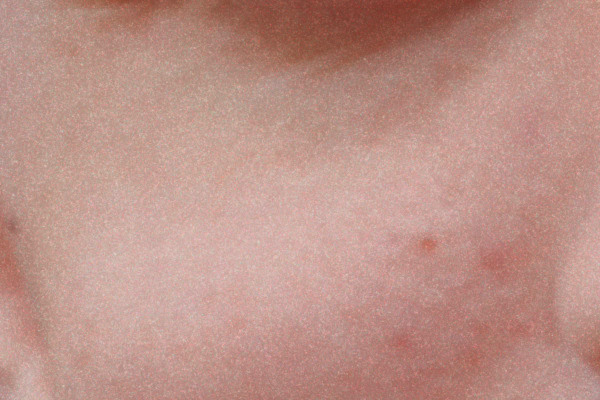
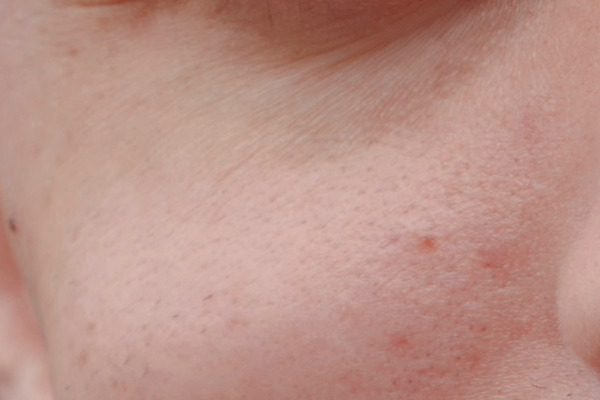
Repeated on the exact 600 × 400 patch shown below, the same method gives 1.2, 1.6, 1.9 and 1.7 % at 1080 px and 3.9 % on the master. The 35 mm look is the same emulsion at 35 mm's magnification, so its grain is coarser at every size. The 120 look is the one I measured directly; the edge softness is measured from both my 120 and my 35 mm scans.
The crops, at 100 %
All four are cut pixel for pixel from the files Grain Studio wrote, converted from Display P3 to sRGB, and saved as JPEG at quality 92 with no chroma subsampling. Nothing was retouched. They are shown at one file pixel per CSS pixel without smoothing, so a Retina screen draws each pixel as an even 2 × 2 block; on a phone they are scaled to fit. Click a crop to open the file itself.


What the apps charge
Prices as shown on the US App Store or the maker's own site on 23 September 2026, one-time unless noted. They change; each app's own page is the reference.
| App | Price |
|---|---|
| Halide Mark III | $69.99 |
| Darkroom | $99.99 |
| Photomator | $119.99 |
| DxO FilmPack 8 | $149.99 |
| Dehancer photo | $49.99 a year |
| Film(ish) | $19.99 |
| Grain Studio | $29.99 once, for iPhone, iPad and Mac |
Grain Studio is free for 7 days at full quality, then a one-time unlock, no subscription. One purchase for iPhone, iPad and Mac.
Grain Studio · Support · Privacy
Grain Studio is not affiliated with any film manufacturer, nor with the makers of the apps named above.